| Author |
Message |
    
David Sheriff
Board Administrator
Username: admin
Post Number: 166
Registered: 01-2004
| | Posted on Tuesday, August 12, 2008 - 09:49 pm: | 

|
This course will not have a formal text. Reading material from the web will be assigned instead.
Navigation and collision avoidance
Read the material in this post before the 9/4 class.
Wikipedia on navigation. With the number of Wikipedia references, you might think you could look up the content of this whole course without ever leaving Wikipedia. MST-218 is not about primary, original research so good secondary sources are just fine. The wiki process produces some of the most comprehensive, consensus secondary sources. This source moves through the subject very quickly and you can hardly afford to miss the meaning of a relevant sentence. Be sure to make use of the hyperlinks to go into further detail as needed. For the purposes of this class, you can skip the sections from Celestial Navigation through Inertial Navigation. The "Day's work in navigation" section refers exclusively to celestial navigation. You can skip that too.
Raster and Vector charts compared
raster vs. vector again Every feature on a raster chart is composed of pixels with color values. A computer can only display the picture. It cannot recognize any of its features or manipulate them in any way except to zoom in and zoom out. Every feature on a vector chart is a mathematical expression. The chart display is created in real time from the vector information in the chart database. Since the computer has access to all the data on the chart, it can warn you if your track is heading into shallow water. If you are drifting outside a channel the computer can theoretically sound an alarm. The computer should be able to predict when you can see various lights based on your distance and azimuth in regard to the light. The computer can paint a fairly uncluttered picture and reveal hidden data by selecting a feature, like putting the cursor over a buoy. The computer can display chart data in "3D" moving the viewer's eye to various positions and exaggerating the vertical scale, for instance. Just like in a video game, the computer can "fly" you through a course, manipulating the visible elements to consistently present a realistic view.
Finally, a vector chart can be enhanced over time by adding new data such as new soundings or topographic features on land. In the press to produce vector charts quickly for use by commercial ships, topographic data has been left off many vector charts. In vector charts, features are grouped by "layers". LORAN overprinting, which clutters so many raster charts, can simply be turned on or off at will. Ultimately, the display can be tuned to show you only what is relevant to your immediate task, like making a harbor entrance.
Data from other sources that is referenced to the same datum can be overlain on the chart. The layers can be transparent to some features and opaque for others. This is essentially GIS. Maps of fish populations can be integrated into the picture. Wave patterns and currents from real-time data could be integrated into the picture.
Some features that lay on top of the entire chart can be displayed on either raster or vector charts. If someone activates a DSC radio call, their position can be plotted instantly. Digital Selective Calling will turn VHF into more of a private line radio service. Aside from emergency calls, you only will hear calls from vessels that have keyed in your address. AIS can give your plotter enough data to show the positions, tracks and predicted courses of all AIS equipped vessels in the area. It can plot closest point of approach, CPA, and time to CPA, TCPA. Since radar data is now digital as well, it can be overlain on the base chart. The safety implications of converting all chart and otherwise spatially related data to numeric formats will be profound.
Video of "Marine chart basics" from Garmin Goes through a little chart exercise to show off Garmin's new MFD, the GPSMAP 5208. "MFD" is apparently Garmin techspeak for multifunction display. What this really shows off is the unit's touch screen, so the title is a little deceptive. Extra credit: What rather significant error does the narrator make in the video? Do you suppose he just misspoke?
COLREGS, the international regulations on maritime right-of-way and other provisions to prevent collisions Read parts A and B (Rules 1 - 19) This will be worthwhile printing out and bringing to class for our "Avoiding Collisions" discussion. The same material is presented in the US Navigation Rules in the links section. The NAVREGS cover both COLREGS and the inland rules. Inland rules, for rivers and such, are not our immediate concern as this course is ocean oriented. Looking directly at the COLREGS gives you less material to sift through. Consult the NAVREGS to find the dividing line where the rules change.
Perugini, Nick "Behind the Accuracy of Electronic Charts--What Every Mariner Should Know about Electronic and Paper Charts." Who are you going to believe when they conflict, your radar or your chartplotter?
|
David Sheriff
Board Administrator
Username: admin
Post Number: 200
Registered: 01-2004
| | Posted on Friday, August 29, 2008 - 11:12 am: |
|
Electronically determining position
reading material for the 9/11 class, the next 4 items
Garmin GPS 76Cx manual download page It appears that we will all be using 76s of some sort, mostly GPS 76Cx. Download the manual and the quick start guide. We will review programming and setup in class. The manual is not very good for marine applications.
Garmin's short summary of the GPS system There may be a better short summary of the GPS system and I'll post it when I find it. In an ideal world, I would not post something from a commercial website as reading material. In reality, Garmin is a major supplier of GPS receivers and has an interest in publishing a brief, fundamentally accurate summary of the GPS system. I will trust that today's students have been sufficiently bombarded by commercial messages to filter the advertising claims from the facts. More specifically, to assume that a claim for Garmin's units is not, in fact, true for virtually every GPS receiver.
Chuck Husick on GPS, DGPS and WAAS This article is a little dated, but as such it gives a pretty good summary of DGPS. WAAS is more accurate than DGPS (and was developed to address a different problem), so knowledge of DGPS is mostly of value so when you run across one you do not look too stupid. Furuno makes a GPS with both DGPS and WAAS so maybe they consider the two to be backups for each other. Maybe they get more out of all three signals combined, but I doubt it.
2001 Volpe report analyzing the vulnerabilities of GPSRead the first 9 pages (the executive summary)
5.
read the rest of these items by 9/18
Wikipedia on LORAN-C Get the general idea. This system is not quite as obsolete as some might lead you to believe because it is the only backup to satellite (GPS), radiobeacons and ground-based radar navigation in the US. If you are flying aircraft, this can become critical.
eLoran fundamentals February. 7, 2008:
"Today the U.S. Department of Homeland Security will begin implementing an
independent national positioning, navigation and timing system that complements the
Global Positioning System (GPS) in the event of an outage or disruption in service.
The enhanced Loran, or eLoran, system will be a land-based, independent system and
will mitigate any safety, security, or economic effects of a GPS outage or disruption. GPS
is a satellite-based system widely used for positioning, navigation, and timing. The
eLoran system will be an enhanced and modernized version of Loran-C, long used by
mariners and aviators and originally developed for civil marine use in coastal areas.
In addition to providing backup coverage, the signal strength and penetration capability
of eLoran will provide support to first responders and other operators in environments
that GPS cannot support, such as under heavy foliage, in some underground areas, and in
dense high-rise structures. The system will use modernized transmitting stations and an
upgraded network."
The links section has much more on eLoran including an exclusive interview with Zach Conover, who heads market leading CrossRate Technology. CrossRate's eLoran / GPS is just about on the market.
|
David Sheriff
Board Administrator
Username: admin
Post Number: 202
Registered: 01-2004
| | Posted on Friday, August 29, 2008 - 11:16 am: |
|
NMEA 183 and other inter-device data communications
Garmin's take on interfacing their GPS units to PCs This is a very useful reference. Workable if not strictly accurate in all of it's claims, as we will point out in class. |
David Sheriff
Board Administrator
Username: admin
Post Number: 199
Registered: 01-2004
| | Posted on Friday, August 29, 2008 - 11:11 am: |
|
Determining direction: The Compass
Read the material down through the end note by 9/25
Biewenga, Bill,"Getting Your Bearing Straight" Cruising World, September 2003 Introduction to magnetic compasses.
simplified discussion of fluxgate compass The technical description of how a fluxgate compass works is well beyond what any student needs to know for the purposes of this course.
Magellan GPS compass
Furuno GPS compass
B&G single axis rate compass Some companies are quite frustrating at the very small amount of information they post on the web. If you look for B&G's 3 axis rate compass you'll find even less.
The list of Navico companies Because you can't tell the players without a scorecard.
ring laser gyroscopes Also follow the link to fiber optic gyroscope.
So if it's not a ring laser gyro, what is it?
A MEMS gyro used in consumer electronics Once they are etched in silicon and cheap enough for consumer stuff, does it really matter what they actually mean when they write "gyro"?
Eh? MEMS? So, if we define a rate compass as an electronic direction element (like a fluxgate) stabilized by gyros of some sort so the output stops bouncing around, do we need to know any more? Magnetoinductive compass? Hall-effect compass? Magnetoresistive compass? Magnetoelastic compass? They're all out there. In the final analysis, it's the performance of the end product that matters, not how they do it. And if it's a marine device where the market is pretty small, you can bet it will be expensive. All that R&D has to be amortized fairly quickly because competitor Z may come out with a better, less expensive device next year.
|
David Sheriff
Board Administrator
Username: admin
Post Number: 242
Registered: 01-2004
| | Posted on Saturday, September 13, 2008 - 07:05 pm: |
|
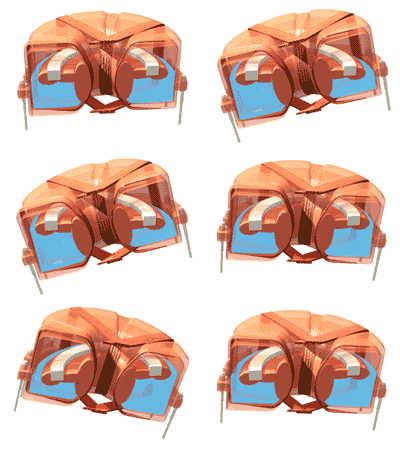
This animated image, courtesy of Autonnic Research Limited, shows their method of rendering a fluxgate less sensitive to modest degrees of tilt. The magnetically permeable core self-levels by floating on a liquid so that it measures only the horizontal component of the Earth's magnetic field.
The component shown is approximately an inch in diameter. It is the core of their current marine NMEA-183 compatible fluxgate compass. Our class demo gray plastic fluxgate compass was produced by Autonnic and probably contains a similar element. Note the pins for soldering the device to a through-hole PC board. This capsule is the core of fluxgate compasses marketed by competing major marine OEMs.
 |
David Sheriff
Board Administrator
Username: admin
Post Number: 228
Registered: 01-2004
| | Posted on Wednesday, September 03, 2008 - 08:33 am: |
|
The Marine Autopilot
The granddaddy of all autopilots The large mechanical autopilot compass we will show in class is a Wood Freeman "Metal Marine Pilot." Perhaps not surprisingly, parts are still available for Wood Freeman autopilots dating back to the 1930's. The first sentence of this reference is worth the entire price of admission.
steering stability strongly affects autopilot performance This may seem to be a quaint reference, but I think it explains why some autopilots work much harder than others.
Raymarine's autopilot web site section I have not been able to come up with a concise, readable reference on how course and track controllers operate. Please browse through the Raymarine autopilot website to get a feeling for the variations of pilots and packages of required components. Autohelm developed a very complete line of autopilots and, for a time, their name was almost synonymous with the product. Raymarine purchased Autohelm about ten years ago and has continued to develop the products.
end of readings for 9/25 |
David Sheriff
Board Administrator
Username: admin
Post Number: 201
Registered: 01-2004
| | Posted on Friday, August 29, 2008 - 11:14 am: |
|
readings for 10/2
ALL REFERENCES TO "SEECLEAR" ARE TO BE IGNORED. In class the program has proved to be too buggy for an inexperienced group of students to manage.
Coastal Explorer trial will be used instead - see below
Instead of chartplotter readings, we are all going to learn to use SeaClear II. Read the manual. Install the software. Download and activate the charts. Get familiar with the program in planning mode. SeaClear has three big virtues. It is a Practical Sailor best value selection, partially because it is free. Third, chartplotter software, including SeaClear, may be a little harder to manage than a proprietary chartplotter, but this one uses real charts and has most of the functionality. If you can learn this program, you can handle any chartplotter. There is a little learning curve, but functionality includes everything handheld GPS does and it does it with real charts.
The Chartplotter and charting display systems
NavNet 3D |
David Sheriff
Board Administrator
Username: admin
Post Number: 263
Registered: 01-2004
| | Posted on Saturday, October 04, 2008 - 10:17 am: |
|
This is stuff you will need for 10/9
To download and upload waypoints from your Garmin GPS76xxx you need a) the USB cable (or serial cable) that plugs into the back of the unit and b) this Garmin software.
If you are going to communicate with a GPS over the serial cable, you must set the communications mode to "Garmin" not "NMEA." Once you are ready to talk to a charting program again, you may need to switch back to "NMEA."
Unzip the software to some convenient directory. From within that directory, click "setup.exe." The software should load onto your computer.
Attach your GPS (powered up) to the computer with a cable. From within the program click "transfer, receive from device." Whatever is in your GPS will transfer to your computer. I leave the rest to you.
[This is my justification for putting this software on the website: Garmin charges $30 for this software, but they supply one copy for each GPS76xxx they sell. We bought the GPS units you have, but did not distribute the cables and software. I got the cables to you. I don't know where the software disks are. Having the GPS units, you have a right to use the software. Here it is. It is highly unlikely someone other than members of this class will be able to find this download. Consequently, I do not think I am violating Garmin's copyright in any meaningful way.] |
David Sheriff
Board Administrator
Username: admin
Post Number: 272
Registered: 01-2004
| | Posted on Tuesday, October 07, 2008 - 08:31 am: |
|
We have certainly had our fun with SeaClear. I believe this trial will allow us to do pretty much everything in a commercially supported program. It is quite a bit easier to use. It will not work in navigation mode for more than 15 minutes, but it should let us develop routes for uploading into the Garmin and Raymarine chartplotters.
Mad Mariner review
This will contrast nicely with our class experience with free programs.
Reviewer's guide - a good detailed summary of the program
So load it up and let's see where we can go with it.
Coastal Explorer trial |
David Sheriff
Board Administrator
Username: admin
Post Number: 267
Registered: 01-2004
| | Posted on Saturday, October 04, 2008 - 10:52 pm: |
|
The Beer: Gritzmacher, Collins, Goddard
|
David Sheriff
Board Administrator
Username: admin
Post Number: 266
Registered: 01-2004
| | Posted on Saturday, October 04, 2008 - 10:49 pm: |
|
The Acorns: Campbell, Brackley, Acosta maybe
|
David Sheriff
Board Administrator
Username: admin
Post Number: 265
Registered: 01-2004
| | Posted on Saturday, October 04, 2008 - 10:48 pm: |
|
The Pizza: Biglari, Lavino, Tam
|
David Sheriff
Board Administrator
Username: admin
Post Number: 264
Registered: 01-2004
| | Posted on Saturday, October 04, 2008 - 10:45 pm: |
|
The Wine: Howe, Wells, Kobayashi
|
David Sheriff
Board Administrator
Username: admin
Post Number: 268
Registered: 01-2004
| | Posted on Saturday, October 04, 2008 - 11:11 pm: |
|
This activity is for the development and demonstration of GPS skills. There will be no makeup session if you miss it.
Geocaching exercise: We divide into four teams, comprising a food group and a drink group. Teams have been named partially because the icons for your waypoints look quite different and will show up on a black-white display. Each team will download it's waypoint file and transfer it to each member's GPS. Equipment will be provided in the classroom to do this, but get a head-start if you have everything you need.
Everyone should understand how to download and transfer waypoints. Teams cannot leave the classroom until each member's GPS is set up properly.
The teams will start the exercise at the following waypoints and then following them in any order:
Beer: M013
Wine: M008
Pizza: M23.5
Acorns: M020
This will set the food groups at one end of the course and the drink groups at the other. Everyone has sticks distributed over the entire course. Don't recover any sticks early. This will be done during class lab time.
Each team must recover it's numbered sticks and none of the others. The food groups and the drink groups will work in the same area if you need safety in numbers. Otherwise work separately. I will provide a large flashlight to each team. Do not let anyone wander off alone. It will be dark and you are responsible for each other within the team just like on a boat. I recommend programming the Campus Police number into all cellphones: 949-582-4699.
Each team member must have only the appropriate points loaded and each team member should take the lead in recovering an equal number of sticks. One waypoint per stick.
Sticks have two digit numbers and are listed in the waypoint description field first. Photos to pinpoint the location have 3 digits and are listed second. I will provide two copies of each photo. Paw through them and get the ones your team needs.
Team members should help each other through any issues so that everyone understands how to use the equipment for the intended purpose. Cross check each other's GPS's to make sure everyone is set up appropriately at each point in time. Everyone should follow along with each waypoint.
Teams have been assigned with a view to having a good mix of experience on each team. These teams will carry over to the on-water exercises.
There are often two sticks at one location. Make sure you look at the number on the stick before detaching it.
End of material for 10/9 |
David Sheriff
Board Administrator
Username: admin
Post Number: 175
Registered: 01-2004
| | Posted on Monday, August 18, 2008 - 09:15 pm: |
|
start of readings for 10/16
Radar -- Seeing with microwaves (and BEING SEEN)
Chuck Husick on Radar Really basic but he touches all the bases and reveals the lie built into "48 mile" radar sets, for which I give him a lot of credit, being a West Marine employee. On the other hand, maybe people can see approaching storms with 48 mile radar. This article is worth reading several times or even outlining because so much is packed into it. If you glaze over one paragraph you will miss something.
See the radar horizon piece below.
Radar target definition, by Steve Dashiew This article will give you an idea of what a really good, sophisticated radar looks like on the display. For coasting around Southern California, most get by with much less radar capability. I have the least expensive Furuno stand-alone radar on La Mouette and I feel that it is perfectly adequate. The weather is good here and the seas tend to be mild. Furuno is one of the few companies that still makes stand-alone radar that is not integrated into the same display as the chartplotter, fishfinder and engine display. JRC also makes stand-alone units. Furuno also makes some of the most sophisticated integrated display instruments. In this article you also see a "black box" output to separate display screens where there may be no unique radar display at all. If you are looking for the most radar for the money and you can't afford to add the chartplotter and fishfinder, which was my situation, then a standalone radar is the ticket. I have Furuno's bottom-end 1623 and consider it to be no slouch.
So you think a freighter will see that little piece of plastic you call a boat on their radar? Don't bet your life.
Really bad news about radar reflectors The Qinteq report.
US Radar Reflector Technical Study This is all pretty scary stuff if you operate where a commercial ship might run you down for not seeing you on radar. For the record, I keep a Davis EchoMaster on it's own halyard hoisted to the spreader in the "catch rain" position. I'm going to switch it to "double catch rain" at some early opportunity.
Almost like having your own RACON, this device produces the strongest radar return of all the devices tested. It also gives you an alarm if your boat is "painted" by the radar of an approaching ship. |
David Sheriff
Board Administrator
Username: admin
Post Number: 173
Registered: 01-2004
| | Posted on Monday, August 18, 2008 - 08:57 pm: |
|
Radar Simulation Software
In the next class, I will be distributing download and license codes for Starpath Radar Simulator. We will introduce this product in lab. You will have to go to the download site and enter your serial number to download the software. The file is 20 megabytes. If anyone has a sufficiently slow internet connection to make this a burden, see me for a copy of the CD.
This software license becomes your property paid out of your materials fee. You can only install the software three times and the license becomes void. That means once on three computers or three times on one computer. Activation involves an exchange with the manufacturer's website, and that is how they keep track of the number of installs. I would advise keeping the number to yourself. You might want to re-install the software when you get a new computer.
end of readings for 10/16
start readings for 10/23
The homework for this week is to become somewhat proficient on your radar simulators and read the relevant portions of the user manuals below. Both boats have a MFD chartplotter, GPS, radar.
We will meet at the boats: 33 27'42.05" N, 117 42'13.26 W. 1800. You may park in the lot at 46.03"N 11.67"W. The gate to the boats is 43.34"N 13.24" W. Call if you are late and get locked out.
We will familiarize ourselves with the equipment on Pilgrimage (Garmin 5212) and Acadia (Raymarine) as well as live Coastal Explorer running on my laptop and as many other laptops and GPS's as you want to bring. We will figure out how to transfer waypoints and a route from PC to chartplotters and reverse.
We will also check out boat systems so we will be prepared to depart ASAP next week for on-the-water exercises.
We will also deal with radar simulator issues.
garmin MFD 5000 series manual
quick reference guide
I'm not sure what Raymarine equipment is on Acadia, but I suspect it is the C series.
C series reference
quick reference guide
end readings for 10/23
prep for 10/30 class
We will be taking both Acadia and Pilgrimage out to work with Chartplotters and Radar at sea. Larry Barley will join the Acadia crew as he is the resident expert in handling that boat. We will all meet on Acadia for the first 10-15 minutes to let Larry talk through handling the boat. In retrospect, we should have done docking practice last week.
The sequence of events for this week are to plot a course out of the harbor (to a geographic point I will give each vessel) using the chartplotter. Follow that course. We will then do various intersecting evolutions to practice setting waypoints and to develop familiarity with the radar. With two teams on each boat, one team will take the helm and provide a sharp lookout. The other team will operate the equipment. At the end of each evolution, we will swap team roles. We will operate approximately one to two miles off the Dana Point harbor entrance. This should be far enough out that we do not have to worry about lobster traps or vessels coming and going without sufficient reaction time. I will be giving you waypoint coordinates and new courses via channel 72. The team on the equipment will handle all radio communications. You should be prepared to transmit your position, course and speed at my request.
The "lookout and helmsman" team will have a handheld VHF monitoring channel 16. The navigators will use either handhelds or the ship's radio on 72, low power.
I will be on one of the boats, which is good because I can observe directly and bad because I can be on only one boat at a time. So do your preparation as I will not be able to tell you how to operate the equipment.
You should expect to function in teams without my direct support. I will be choreographing the exercise from the "flagship." I will be using charting software to keep track of you. I will have direct position input from the vessel I am on and will rely on radar data and your reported positions for the other vessel. We will use dd,mm.mmm;ddd,mm.mmm data formats with N and W assumed. Bring something to write on. As the evolutions proceed, we will probably only use minutes and decimal minutes if the degrees do not change.
For each team, one person will do the radio and log instructions. One person will operate the equipment with assistance from the third team member, if available. In case of absences, no team will have less than two people.
Your preparation should be: 1. Complete familiarity with the relevant portions of the instruction manuals for both sets of equipment. 2. Enough practice with the radar and charting simulators to minimize the learning curve.
I will publish a list of activities I expect each of you to demonstrate to me on the equipment. It will be comprehensive but, hopefully, not unreasonable. We have at least three sessions on the water. This is to allow enough time for each of you to develop good reflexes on the equipment. The danger I am trying to head off is to have you think you know things well enough and then to freeze up when you are by yourself with your new radar a year from now.
Therefore, I am going to try to exercise each of you on the equipment significantly past the point where you think you know it well enough. To pass my evaluation, everyone must be able to operate the equipment in any reasonable mode by yourself without any hints or help. Practice, practice, practice. I will not do any competency evaluations on this first trip.
Finally, notwithstanding any orders to the contrary, the lookout / helm teams are responsible for the vessels. You should follow directions given by the navigation team unless your own judgment compels you to do otherwise. You will navigate by magnetic compass. You will have to work out any compass error between the two teams.
end 10/30 |
David Sheriff
Board Administrator
Username: admin
Post Number: 204
Registered: 01-2004
| | Posted on Friday, August 29, 2008 - 11:25 am: |
|
readings for 12/4. The last two classes will be back on campus in our usual classroom. I will briefly talk about AIS and Sonar. We may also do a little lab work on the radar simulator. We will discuss the field work. If any time remains, we will begin the review for the final exam.
AIS - Automatic Identification System
Wikipedia on AIS
good stuff about radar detection as a survival aid |
David Sheriff
Board Administrator
Username: admin
Post Number: 203
Registered: 01-2004
| | Posted on Friday, August 29, 2008 - 11:17 am: |
|
We will deal with sonar briefly on 12/4. This would be good material to read before that class
Looking underneath: sounders and sonar
good demo of interphase this is scanning sonar
this is really good.
Using Sonar for navigation, part 1.
Using sonar for navigation, part 2. These two articles by a sophisticated user available on the Furuno website give you a better idea of where sonar is useful and how to use it. I have installed a similar system for a local marine research vessel made by Interphase.
end readings for 12/4 |
|
 Closed: New threads not accepted on this page
 trip - waypoint
 Beer
Beer The Radar Horizon